
Week 11: Attackers try to trick companies – and the NCSC
The NCSC is receiving an increasing number of reports from companies that have received suspicious invoices by email. These emails contain a ZIP attachment, which contains an HTML file. At first glance, the invoice shown in the file appears completely harmless: There are no links, no unusual elements and no obvious signs of malicious software. But this impression is misleading. The latest weekly review reveals the considerable effort attackers invest in disguising their attacks and building trust.

In recent weeks, numerous companies have received invoices that do not appear to relate to any order or purchase. The emails refer to a supposed invoice number and state that the document is attached. The attachment is a ZIP file containing a single HTML file.
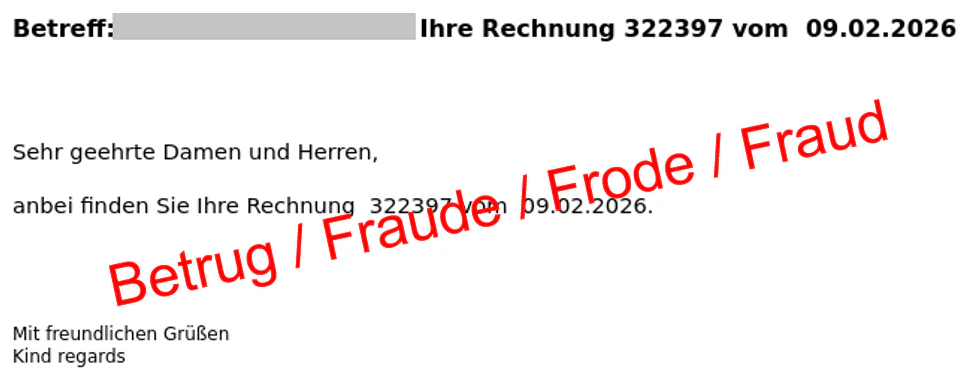
When the ZIP file is extracted and the HTML file is opened, it often displays nothing more than an apparently harmless conversation thread or short excerpt from an old email exchange. At first glance, nothing looks suspicious. There are no clickable links or unusual files. It could easily be mistaken for a misdirected email.
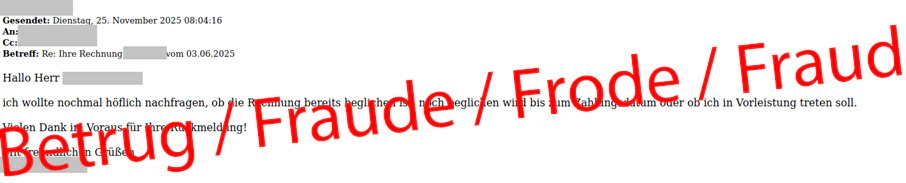
In reality, however, the email appears harmless only at first glance. A closer look at the source code reveals that a connection is quietly being established in the background to an external website hosting a JavaScript file. This script is not always delivered. The attackers first check various conditions, such as the operating system being used, and only provide the malicious content if certain criteria are met.
Another obfuscation tactic is also used: The script is only available for a limited number of requests. Only the first accesses contain the malicious code. This makes analysis much more difficult for organisations dealing with cybersecurity, such as the NCSC. If no malware is delivered, attackers' methods are not immediately apparent, and it is difficult to block the website. Such techniques are repeatedly used by attackers to bypass detection and defence mechanisms.
How does the attack work?
In some cases, the NCSC was able to download and run the JavaScript. If the HTML file containing the malicious JavaScript is opened, a website appears that supposedly displays a PDF document. The site states that a CAPTCHA must be solved in order to access the document. After completing the CAPTCHA, a download link is displayed.
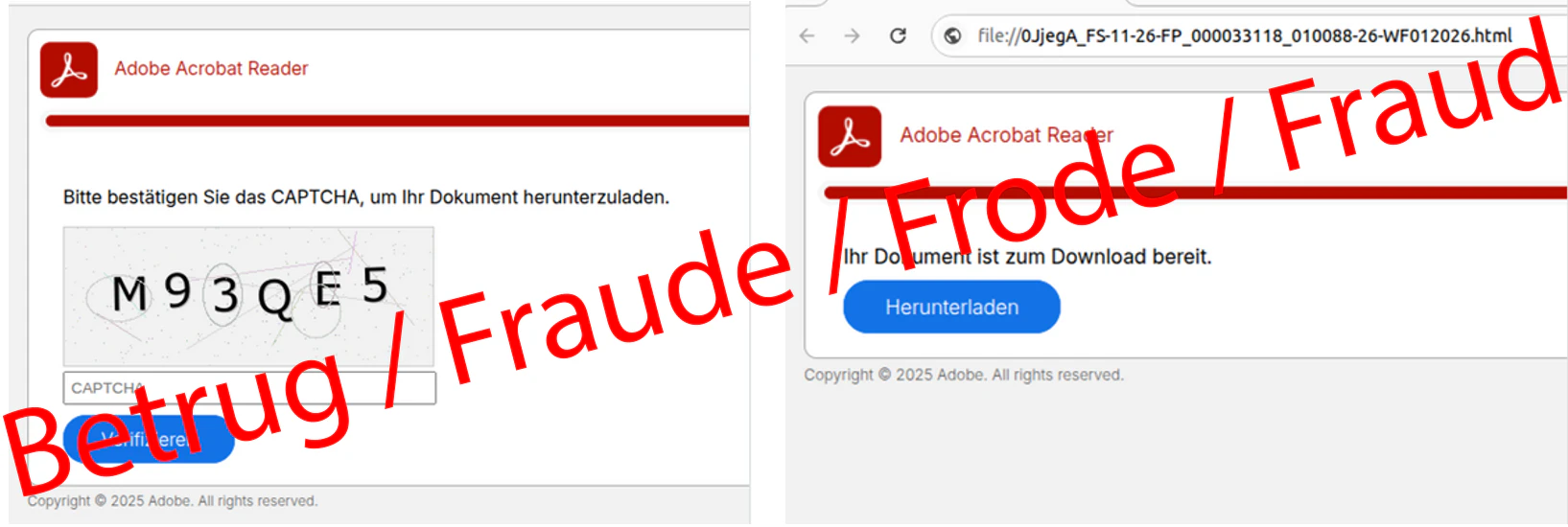
Clicking the download link downloads another ZIP file. This time, however, it does not contain an HTML, but a JavaScript. This marks the final stage of the attack. When executed, the script attempts to download and install additional malware from the internet.
Why use a ZIP file?
This attack chain clearly demonstrates the sophistication with which attackers can bypass technical protection mechanisms and deceive people. The seemingly harmless HTML file containing the conversation excerpt could trick installed security software into classifying it as a harmless document.
Despite these efforts to conceal the attack, there is one important safeguard: Recipients must first open the ZIP file. Fortunately, this still deters many people.
But why don't attackers simply include the JavaScript directly in the email? This would remove the need for the ZIP file, and the CAPTCHA page could appear directly in the email.
Most email programs block JavaScript precisely for this reason. Otherwise it would be much easier for attackers to execute harmful interactive content directly within an email. However, once the HTML file is opened locally, it is handled by the web browser rather than the email client. In browsers, JavaScript is enabled by default because modern websites rarely function without it.
Recommendations
- Be cautious with unexpected file types. In normal business communication, legitimate invoices are almost always sent as PDF documents. Be extremely suspicious of invoices or attachments sent as ZIP archives and never open HTML files contained within them.
- Scammers often use double file extensions (such as "invoice.pdf.html") to trick people. Enable the display of file name extensions in your operating system (e.g. Windows Explorer) to see the true file type.
- If your web browser opens an attachment and then asks you to download another file or run a script, cancel the process immediately.
- Configure your operating system so that JavaScript files (".js") open by default in a harmless text editor, such as Windows Notepad. This means that if such a file is opened accidentally, the malicious code will only be displayed as text instead of being executed by Windows Script Host.
- Block file formats that are frequently exploited in cyberattacks at your email gateway. This includes executable files, as well as compressed archives (ZIP), which may contain dangerous scripts (JS or VBS) or unexpected HTML files. The NCSC has published an up-to-date list of potentially dangerous file extensions on GitHub.
- If you have accidentally executed a file of this type, you should immediately disconnect the affected device from the network by disabling Wi-Fi or unplugging the network cable, in order to prevent the malware from spreading within the company network.
Current statistics
Last week's reports by category: