
Week 44: How your home network can become a gateway for cybercriminals
The NCSC has received several reports of malware affecting private home networks. Devices that are accessible from the internet and have security vulnerabilities make it easy for cybercriminals to gain access. If attackers then install ransomware, private data such as photos or documents may be lost for good. The risk is particularly high when vulnerabilities are left unpatched and devices are not kept up to date.

Many households now have a wide range of connected devices, from PCs, tablets and network-attached storage (NAS) devices to cameras, heating systems, roller shutters and air conditioning systems. Whether these devices can be accessed from the internet depends largely on how the home network and router are configured.
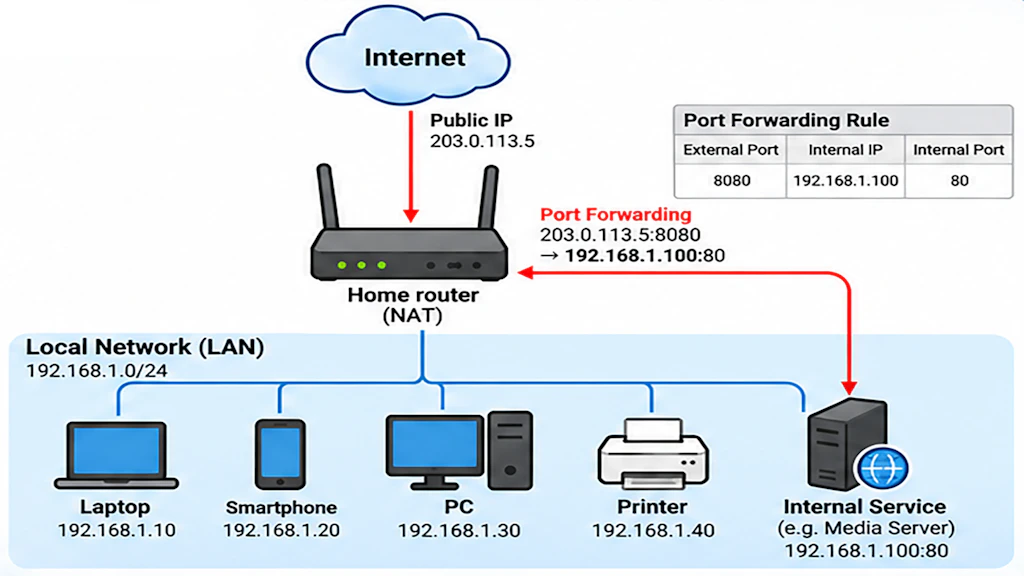
Only a few internet service providers still supply their devices in what is known as bridge mode, which does not provide router functionality. Without additional security measures, devices on these home networks are exposed directly to the internet, making them easy targets for attackers. Fortunately, most providers now supply their devices in router mode. This creates a private network in which connected devices such as PCs, tablets, mobile phones, NAS devices and smart home systems are neither directly visible nor accessible from the internet.
However, many people want to access certain applications or devices on their home network when they are away from home and control them remotely. They might, for example, want to listen to music, share photos with friends, or control smart home devices such as security cameras. This is possible using port forwarding, which is sometimes also referred to as network address translation (NAT), depending on the device. Port forwarding makes an individual service running on a device within the home network accessible from outside the network. It does not expose the entire home network to the internet, but only the service in question.
Vulnerabilities in widely used products
In recent weeks, there has been much discussion about a vulnerability in PHP, a widely used programming language for web applications. The NCSC has published a corresponding warning. PHP is also frequently used by services running on home networks. It is not always obvious when an application uses PHP in the background, which is why it is important to update the products and services you use as soon as possible.
PHP is not the only product currently affected by security vulnerabilities; the popular Plex media server is affected too. Anyone who has not yet updated Plex is at risk of having their device hacked, which could give cybercriminals complete control over it. Reports received by the NCSC show that this is a very real threat.
A dangerous combination
Unpatched security vulnerabilities combined with accessibility from the internet are a dangerous combination that cybercriminals deliberately seek to exploit. Together, these two factors significantly increase the risk of a device being compromised. In some cases, attackers can gain access without being detected and obtain administrator privileges.
Once attackers have gained access to a system, they can use it for various purposes, including:
- Encrypting files with ransomware and demanding payment to restore access;
- Stealing private data and using it for extortion, often in combination with ransomware;
- Installing software to mine cryptocurrencies at the victim's expense (called cryptomining);
- Using the device as a residential proxy, routing internet traffic through the victim's connection without their knowledge to conceal the attackers' origin.
Unfortunately, it is not always easy to tell whether a system has been infected. Often, victims only become aware of the infection when they receive a ransom demand. One possible sign of an infection is a device running more slowly than usual, often accompanied by an unusually loud or constantly running fan. Cryptominers, for example, require considerable processing power and can noticeably slow down a system.
In the worst-case scenario, the device may need to be reinstalled. You should also check other devices on the same network for signs of infection or have them checked by a specialist.
Recommendations
- Keep devices up to date and use strong passwords
Make sure all devices on your home network are kept up to date, even those that aren't directly accessible from the internet. Avoid passwords that are too short or easy to guess. The NCSC recommends using passwords that are at least 12 characters long for services that are accessible from the internet. A strong password also contains upper- and lower-case letters, special characters and numbers. - Keep internet-accessible services separate
Ideally, services that are accessible from the internet should be on a separate part of your network (network segment) from your other home devices. Some home routers have this feature, commonly known as a DMZ (demilitarised zone). - Restrict network access
Think carefully about whether a service really needs to be accessible from anywhere on the internet. Geofencing allows you to restrict access to certain countries, and some routers already have this feature built in. Some products also allow you to set a limit on failed login attempts, after which access is blocked. This helps prevent attackers from trying out lists of passwords. - Use a VPN
The NCSC particularly recommends using a virtual private network (VPN). This gives you authenticated, encrypted access to your home network without having to expose any services directly. Most routers support one or more common VPN protocols, such as OpenVPN or WireGuard.
If possible, exposed services and VPN access should be secured with two-factor authentication (2FA). - Get advice if you're unsure
If you're unsure how to set up or secure your home network, ask someone who knows their way around computers or seek professional advice.